Tuesday, March 15, 2011

Linking Garmin Connect, Blogger, Twitter, Facebook – Part 2 (Publishing Garmin Race info to Twitter and Facebook)

(Click on the screenshots if they aren't clear)
In my previous post, I shared details on how I update my blog automatically to include Garmin output from my races. In this post, I've listed the instructions on how I publish my Garmin info from my races to Twitter and Facebook (automatically).

Currently, every time I'm done with a race (and I download the Garmin output), My Twitter account is updated is..

And my facebook status is updated too..

Both of the above happens automatically once I download the Garmin output. Similar to my earlier post, this works off RSS feeds too. The earlier post contains the information on where to find the RSS feed link to your Garmin and how to set the privacy so only the "Races".

Updating Twitter with Race infoThis was done using twitterfeed – A very straightforward site/tool to retrieve new info from a RSS feed and 'tweet' that info. Step 1 was to enter the RSS address:

Step 2 was the 'fun' part. In the 'Post Prefix' field, enter whatever you want to say before the Garmin link appears on your tweet and facebook status. In my case, I entered 'My race info..'


Post suffix field must be set to end with "#fb". This is required to update facebook.


Final step is to enter and authenticate your twitter account. Once completed, any new races will automatically appear in twitter in the following format – "My race info..(Race name) (Garmin Link) #fb"


Updating Facebook with Race infoThis was done, using Facebook's "Selective Tweets" application. This is another straight forward app, which lets to update your facebook status automatically twitter. However, unlike some apps, this only updates facebook status with tweets that end with "#fb".


Once done, your Garmin race info flows automatically to facebook too :

So in a nutshell, after a race, all I do is download my Garmin output, update my Race name, 'unlock' that particular activity. The twitter update, my blog update and facebook update is all done automatically.

Facebook and Twitter does have a few RSS-related apps which lets you auto-tweet / update your status. However, every other app I tried had a considerable amount of time delay or was unreliable (Some of them took upto 24 hours to update). The above method of linked Garmin to > Twitter to > Facebook seemed to be the quickest and efficient.

This technique is not unique to Garmin RSS and can be used to any other similar functionalities too. I've also used the same to update twitter and facebook everytime I update my blog..



Enjoy :)

Saturday, March 5, 2011

Linking Garmin Connect, Blogger, Twitter, Facebook – Part 1 (Updating my blog to include Garmin output from my races)

After a bit of trial and error & a lot of Googleing, I've finally managed to integrate Garmin Connect, Blogger, Twitter and Facebook together. I have now managed to do the following :

  • Automatically update my blog to include Garmin output from (only) my races :
  • List my latest tweets on my blog

  • Automatically update Twitter and Facebook of any new blog entries
In this post, I'll try to explain how I managed to get the Garmin output of my Races to appear on my blog. I'm sure most of the above could be done without too much hassle and in very little time by someone who is tech savvy. But considering it took me a lot of Google'ing and a lot of trial & error, I thought it's only fair to share it in the hope it might help someone else..
Setting up Garmin Connect to display and Feed Garmin info only from your racesThis is the only initial setup that is required. This has been driven in the back end using RSS feeds from the Garmin connect site. The Garmin connect RSS feed can be obtained from the "Dashboard" tab in garmin connect:
Clicking on it will give you the link to your RSS feed -
http://connect.garmin.com/feed/rss/activities?feedname=Garmin%20Connect%20-%20dineish&owner=dineish
Accessing this link will give you details of every single workout. However, I only wanted info of my races published – I really did not want to annoy my Twitter and Facebook friends by publishing every single workout of mine (I think I annoy the non-runners enough already). This was fixed by playing around with the security settings on Garmin connect. By default, all activities on Garmin are set to "Public" which allows sharing of the activities (which resulted in RSS feed having all activities).

I changed the default privacy to "PRIVATE". This can be done by clicking on SETTINGS > DEFAULT PRIVACY and selecting PRIVATE. This will ensure all activities are now locked.


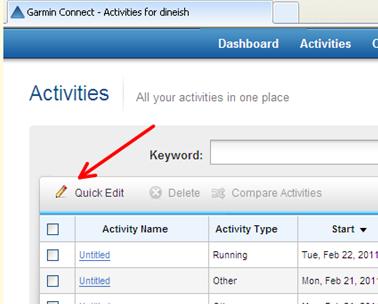
All I have to do now is, every time I want info from a race published, I have to "unlock" just that particular activity. This can be done in the "Activities" tab by selecting "Quick Edit" .

This will give you the option to unlock the activities you wish to publish (under the privacy column). You can also add the description, activity type and event type as required on this screen.
Once done click on FINISH and TADA! Your RACE info is the only info on your RSS Feed link!!! (TIP – be VERRRYYY patient for the initial changes to be updated in the RSS feed. It could take upto a day or two at times)
Now that the RSS feed is displaying only the RACE info, things get a lot easier and we could set up the fun stuff.
Burning your feed using feedburnerYou can use feedburner to "burn" your feed. This is supposed to help you with allowing users to subscribe and provides traffic analysis etc. etc. , but for me the most useful part was that it gave me a much shorter and nicer link to my garmin output feeds - http://feeds.feedburner.com/GarminConnect-Dineish
Automatically update my blog to include Garmin output from (only) my racesI used BuzzBoost in Feedburner for this. This can be done by using "Use as a widget" option. You can also use BuzzBoost to set up a similar widget to any site.

Buzzboost also gives a HTML script that you can copy and paste to any other blogging sites or your own web site.


This sets up a nice column on my blog containing info from my recent races...

In the next post, I'll share the instructions on how to
automatically update twitter and facebook with my garmin output from my races and new blog entries..

Tuesday, February 8, 2011

The post half-ironman hangover and plans for 2011

"Its important to have specific dreams. Dream Big. Dream without fear."
- Randy Pausch


Just like my running and training, my blogging took a long holiday since Canberra half ironman. Now that I'm finally back in some kind of training, I think it only makes sense to plan ahead.

In the last two years or so, I've had a good, solid plan to tick off my goals from my ever growing bucket list. The plan is simple – I assess my situation, plan my goals, put in the long hard yards, achieve the goal (or get very close it), Celebrate!
This plan has been working quite well and over time I've learnt that the 'celebrate' part of my plan is usually my strongest J The post-Canberra half ironman celebration kicked of with Christmas and New year lunch/dinners/parties, a great trip to Malaysia and Singapore with Shyamala and a lazy January which included one too many dinners and numerous days of zero training.
The 'celebrate' part was well executed and was fun. But the flipside was, when I started training at the end of Jan, I realised my fitness counter had been reset to zero and I am still lugging around a few of those dinners. At this point, you usually are not mentally motivated either and try to find excuses not to train. Some of my popular excuses were "I'll train when I get a faster bike", "I'll start training in Feb", "MX paper article says Running is not good", "I need a new shoes", "Got work tomorrow" (popular one on Sunday), "It's been a long week" etc. Etc.
In the rare occasion I did go for a run, I felt extremely unfit, my heart rate was high and it made absolutely perfect sense to walk for the next 2 minutes, then 3 mins, 4, 5 and eventually convert it to a casual walk in the park. Strangely, during that phase, it also makes perfect sense to eat whatever "because I'll start training soon anyway". In a nutshell, it is usually a downward spiral many of us experience at times..
Fortunately, I've been in the position many times in the past and know what it takes to push through and to get the engine started. Consistency is the key .. I had to force myself to get out for a run and stick to the training plan.. I had to keep track of each workout and realise the slow and steady progress and use that as motivation. I've started doing that since late Jan and I think I have already managed to get through the initial mental barrier of not wanting to train and I'm looking forward to tough training sessions already! I've also done my first race and have finally managed to plan out my race calendar for the year.
My only A Grade race for the year will be the Sydney marathon. But after 3 marathons and a couple of half marathons, I've now decided to shift my focus to shorter events and hope to aim for faster times which hopefully in return will help me with the longer races. My race plan for the year is:


This plan will obviously change along the way depending on injuries and other commitments but I'm relieved I've got my year planned out.. Now I'll just have to start training harder and work on having a fast(er) year! J


"You can always change your plan, but only if you have one."
Randy Pausch (The Last Lecture)